
Follow these steps to quickly reset your password on any of our WordPress (.org) client sites.
Quick steps
1. Go to your site’s login page: https://yourdomain.com/wp-login.php (or https://yourdomain.com/wp-admin).
2. Click Lost your password?
3. Enter your username or email and click Get New Password.
4. Open the reset email and click the reset link.
5. Type a new password and confirm. Then log in. 
⸻
Detailed, step-by-step (with screenshots)
1. Open the login page.
In your browser, visit https://yourdomain.com/wp-login.php (replace yourdomain.com with your site). You can also try https://yourdomain.com/wp-admin.

2. Choose “Lost your password?”.
Click the link under the login form.
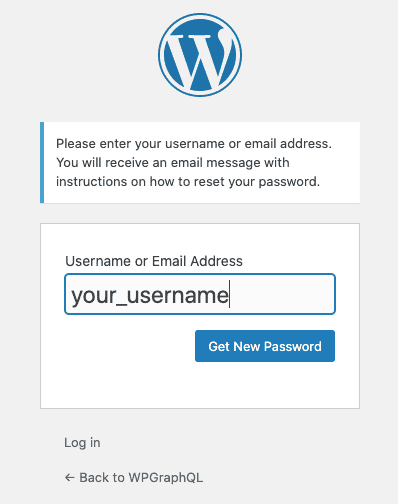
3. Request the reset email
Enter your Username or Email Address and click Get New Password.
4. Open the email.
Look for a message from your site (subject mentions Password Reset).
Click the reset link inside. 
5. Set a new password.
On the “Enter your new password” screen, type a strong password and click Reset Password.

6. Sign in.
Return to the login page and sign in with your new password.
If the reset email doesn’t arrive:
Check spam/junk and “Updates/Promotions” tabs.
Wait a few minutes and then try again (typos happen).
Try entering your username instead of email (or vice-versa).
If your site uses a company email filter, ask IT to allow messages from your domain.
Still no email? It may be a mail-delivery issue on the site—contact our support and we’ll help from the admin side. 
Common messages & quick fixes:
“Invalid key” or link expired → Go back to the login page and request a new reset link. 
Don’t know your username/email? → Contact support and we’ll verify your identity and get you back in. 
Using two-factor authentication (2FA)? → After resetting your password, you’ll still need your 2FA code to sign in.
Security tips:
Use a unique password (12+ characters; mix of letters, numbers, symbols).
Consider a password manager to store it securely.
If you receive a password reset email, but didn’t request a reset, ignore the email and let us know.